
Business Expenses
How to Track Employee Spending: A Complete Guide
If you’re not tracking employee spending, your business’s bottom line may be suffering. Learn how to track employee spending, along with its major benefits.
For UK and Irish finance teams, there’s a familiar problem: if your first chance to question a purchase is when the receipt, card statement, or invoice lands, you’re not really controlling spend. You’re documenting it.
Spend control moves that decision earlier. It puts clear policies, approvals, and limits around spending before (or at the point) a purchase happens.
The stakes go beyond an overspent budget. The Association of Certified Fraud Examiners estimates that organisations lose 5% of revenue to fraud each year, making stronger controls and earlier visibility worth taking seriously.
This guide explains what spend control is, how it differs from cost control and expense management, and how to put it into practice.
Spend control is how a business decides who can spend company money, what they can spend it on, how much they can spend and when approval is needed. Ideally, those controls are in place before the purchase happens.
It’s not just about cutting costs. It’s about giving finance control over how money is used without having to pick through problems afterwards.
That could mean setting approval thresholds, applying limits to company cards, restricting certain types of spend or flagging expenses that fall outside policy.
At its simplest, four questions need clear answers:
Who can spend?
What can they spend on?
How much can they spend?
Who needs to approve it?
Here, we’re talking specifically about business spend control, rather than public-sector controls or consumer spend caps.
The three terms are closely related, but they solve different finance problems.
Spend control | Cost control | Expense management | |
|---|---|---|---|
Focus | The rules around company spending | The overall level and structure of costs | The processing of expenses once they are incurred |
Typical question | Is this spend allowed, and under what conditions? | Are we spending more than we need to? | Has this expense been captured, approved and recorded correctly? |
Where it shows up | Approval thresholds, card controls, spending rules | Supplier reviews, contract renegotiation, budget reductions | Claims, receipts, reimbursements, reconciliation |
What finance is trying to achieve | Keep spending within agreed boundaries | Reduce or reshape the cost base | Keep expense records accurate and complete |
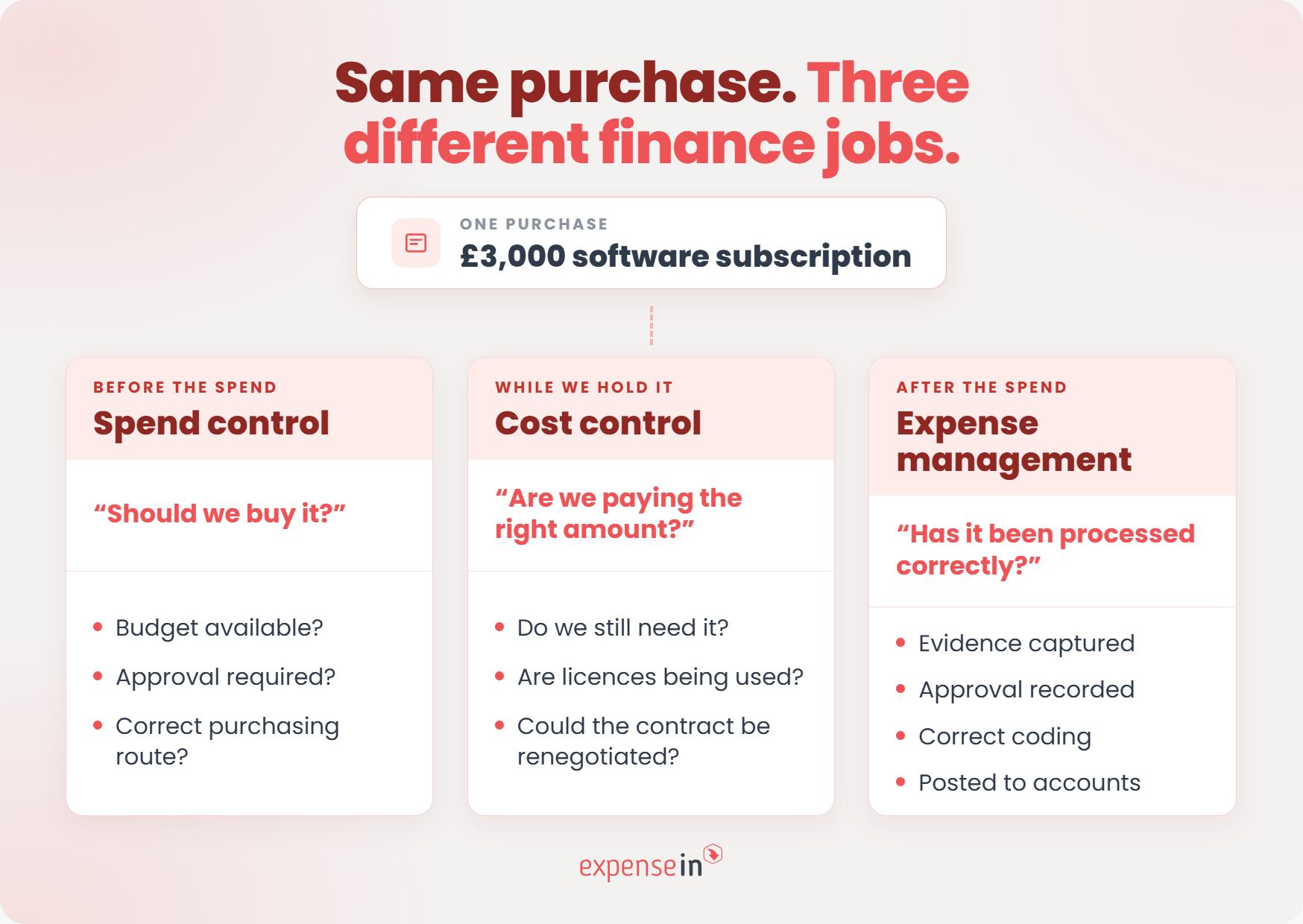
Take a £3,000 software subscription.
Spend control determines whether the team has authority to buy it, whether it sits within budget and who needs to approve it.
Cost control asks whether the software is still needed at that price, whether licences are being used and whether the contract could be renegotiated.
Expense management handles the transaction itself: the supporting evidence, approval record, coding and accounting.
A business can be very good at processing expenses while still having weak control over the decisions that created them.
 Why weak spend control quietly drains your budget
Weak spend control rarely arrives as one dramatic overspend. It tends to show up as smaller problems that accumulate:
expenses submitted weeks late
purchases made outside the agreed process
missing receipts or VAT information
subscriptions nobody realised were renewing
approvals buried in email or Teams
forecasts that move when late spend finally appears
ExpenseIn’s 2025 survey of 500 UK employees found that 49% had used their own money for business purchases, while only 19% had access to a company expense card.
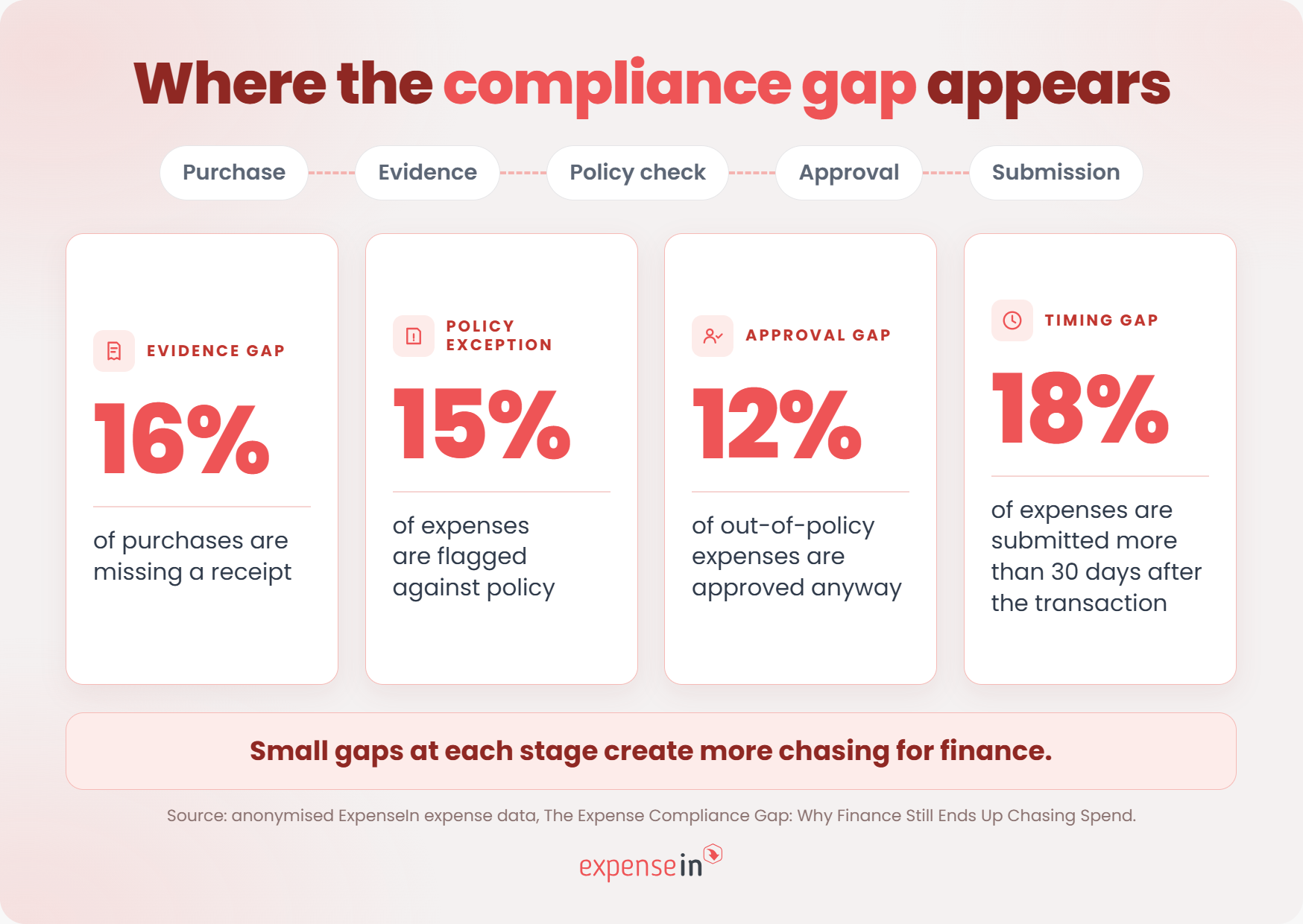
ExpenseIn’s actual expense data shows the lag from another angle: 18% of expenses are submitted more than 30 days after the transaction date.
For finance, that can mean:
a cost centre looks under budget when it isn’t
committed spend is absent from reporting
cash requirements are understated
managers make decisions using incomplete figures
The longer spend stays outside the finance process, the less current the numbers become.
Finance also needs to explain what sits behind a transaction: what was bought, why, what evidence supports it, and who approved it.
For employee expense deductions, HMRC states:
“An expense must be incurred wholly and exclusively in the performance of the duties of the employment.”
That rule has specific tax meaning and doesn’t apply in the same way to every type of business expenditure. But it illustrates why a manager approving an expense is not, by itself, enough to determine its tax treatment.
VAT creates its own record-keeping requirements. Under Making Tax Digital for VAT, VAT-registered UK businesses are required to keep specified VAT records digitally and file VAT returns using compatible software.
In Ireland, Revenue says businesses must keep records that support the information in their tax returns, including receipts for expenses and purchases.
Revenue is explicit about the retention period:
“You must keep the original of these documents for six years.”
For VAT, Revenue also states:
“You need to keep full and true records of all Value-Added Tax (VAT) related business transactions.”
Yet 16% of purchases in ExpenseIn’s anonymised data are missing a receipt.
That leaves finance chasing evidence later, when the receipt is harder to find, and the context behind the purchase may already be fading.
A good expense record should make it easy to find:
the receipt or invoice
the business reason
relevant VAT information
who approved it
when it was approved
Tax and VAT treatment depends on the circumstances. Check current HMRC or Revenue guidance and take professional advice where needed.
Not every policy breach is expense fraud. Most aren’t.
But finance still needs to know when a rule has been broken and decide what happens next.
ExpenseIn’s anonymised data shows that 15% of expenses are flagged against policy rules.
That does not mean 15% of expenses are necessarily inappropriate. A policy flag means the expense has triggered a rule and needs attention.
That might involve:
a limit being exceeded
spending with a restricted or unexpected merchant
missing required information
incorrect coding
an expense submitted without enough context
The value of a control is that those exceptions are visible. Finance or the approver can challenge the spend, send it back, or allow the exception with a recorded reason.
 Your forecast keeps moving
Late spend creates a forecasting problem as well as an admin problem.
Suppose a team has incurred £8,000 of travel costs that haven’t yet been submitted, while another department has committed to a new £12,000 annual software contract.
Neither changes the approved budget. Both change the financial reality.
If that information reaches finance late, it can affect:
budget-versus-actual reporting
departmental forecasts
cash flow planning
decisions about what budget is still available
That 18% of expenses in ExpenseIn’s dataset arrive more than 30 days after the transaction shows why submission timing matters. Finance can only report and forecast against spending it knows about.
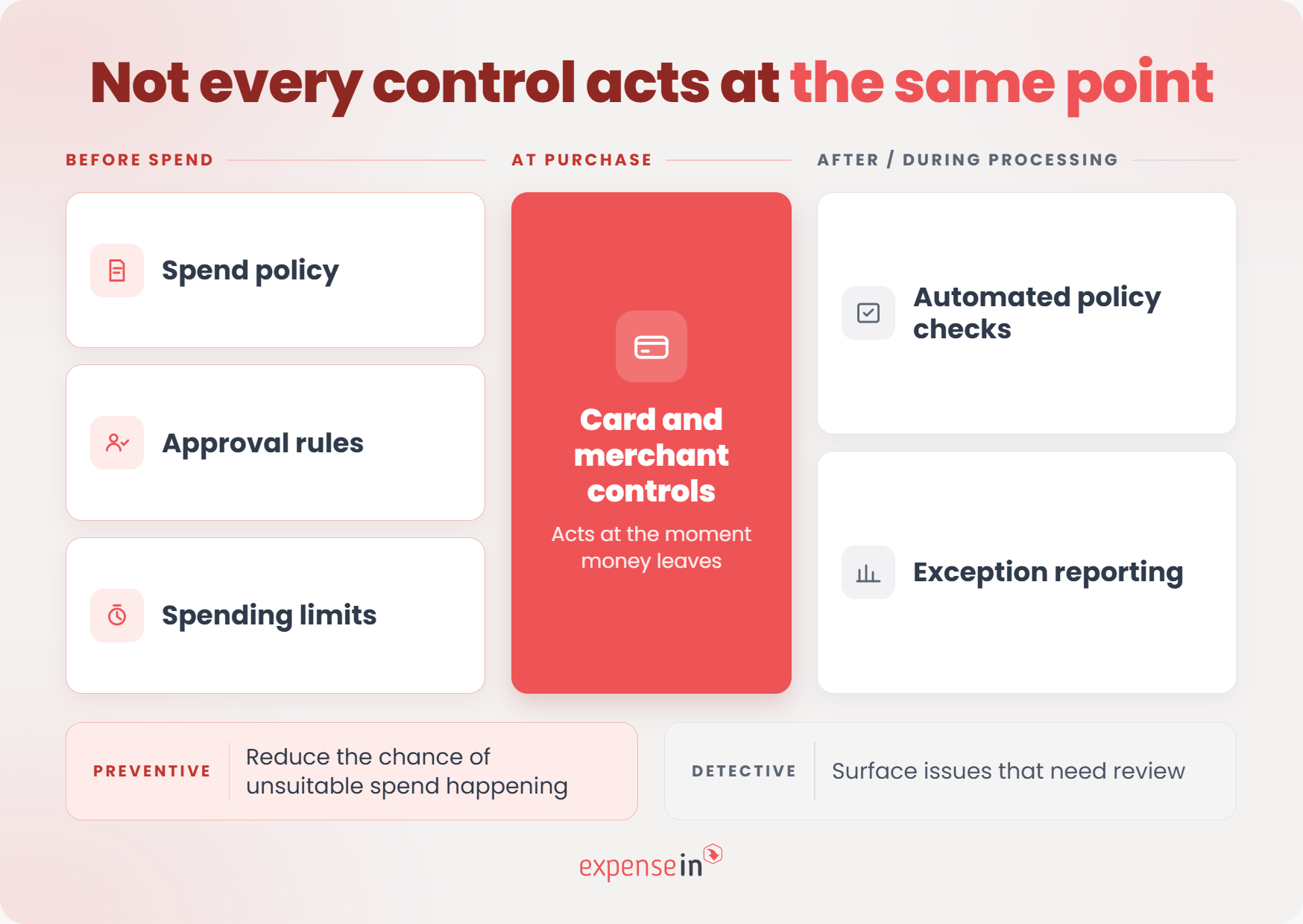
Spend control works best when several controls support each other.
Some are there to stop unsuitable spend before it happens. Others help finance spot exceptions afterwards. UK Government fraud-control guidance uses the same distinction between preventive and detective controls.
 1. A spend policy people can actually use
A spend policy should answer practical questions:
what employees can buy
when they need approval
which payment method to use
what evidence they need to provide
what to do when a purchase falls outside the usual rules
If exceptions are constantly being handled through email or Teams, the policy probably needs more clarity.
Not every purchase needs the same level of scrutiny.
Approvals can vary by value, category, department, budget, or whether an exception is being requested.
For higher-value or more sensitive spending, it can also make sense to separate the person making the request from the person approving it. The Northern Ireland Audit Office highlights appropriate authorisation levels and separation of duties as important financial controls.
The goal is the right approval, not more approval.
The same limit will not suit everyone.
An employee who travels regularly may need different boundaries from someone making occasional purchases.
ExpenseIn Card data shows the difference between broad controls and more tailored ones. 61.1% of organisations in the dataset use merchant-category restrictions, while only 34.4% apply limits by employee, department, or project.
Limits should reflect how people actually need to spend without creating constant exceptions for ordinary activity.
Where employees use company expense cards, controls can restrict how they are used.
For example, ExpenseIn Card spending controls can be configured around merchant categories, countries, spending days, and transaction values.
ExpenseIn’s Card data gives an indication of how those controls operate in day-to-day spend. 19.1% of declined transactions in the dataset were declined because of spend controls or policy limits, compared with 1.3% flagged for suspected fraud.
That’s a useful reminder that day-to-day spend control is mainly about applying ordinary company rules, not treating every purchase as suspicious.
Finance doesn’t just need totals. It needs to know what deserves attention.
Useful reporting might highlight:
spend outside policy
unusual increases by team or category
repeated exceptions
missing evidence
transactions waiting for review
movement against budget
The aim is to focus finance time on exceptions rather than checking every transaction in the same way.
Some checks are repetitive enough to automate.
Spend control software can flag missing receipts, claims over defined thresholds, or incomplete information as expenses move through the process.
Clear rules are good candidates for automation. Decisions requiring context or judgement should still sit with the appropriate person.
Control doesn’t have to mean asking finance for permission every time someone buys a train ticket or pays for a client meal.
The better approach is to make the boundaries clear and let employees operate within them.
That can mean:
setting card limits that match the employee’s role
restricting categories that are clearly outside policy
using sensible approval thresholds rather than approving every small purchase
making receipt capture quick at the point of spend
giving employees a clear route when they genuinely need an exception
The test is simple: is following the approved process easier than working around it?
If the answer is no, adding another rule is unlikely to solve the problem.
Read more in our guide to controlling employee spending without slowing down the business.
The easiest mistake is to start with software.
Start with the process. Work out where spend happens, who owns each decision, and where the gaps are. Then configure the technology around that.
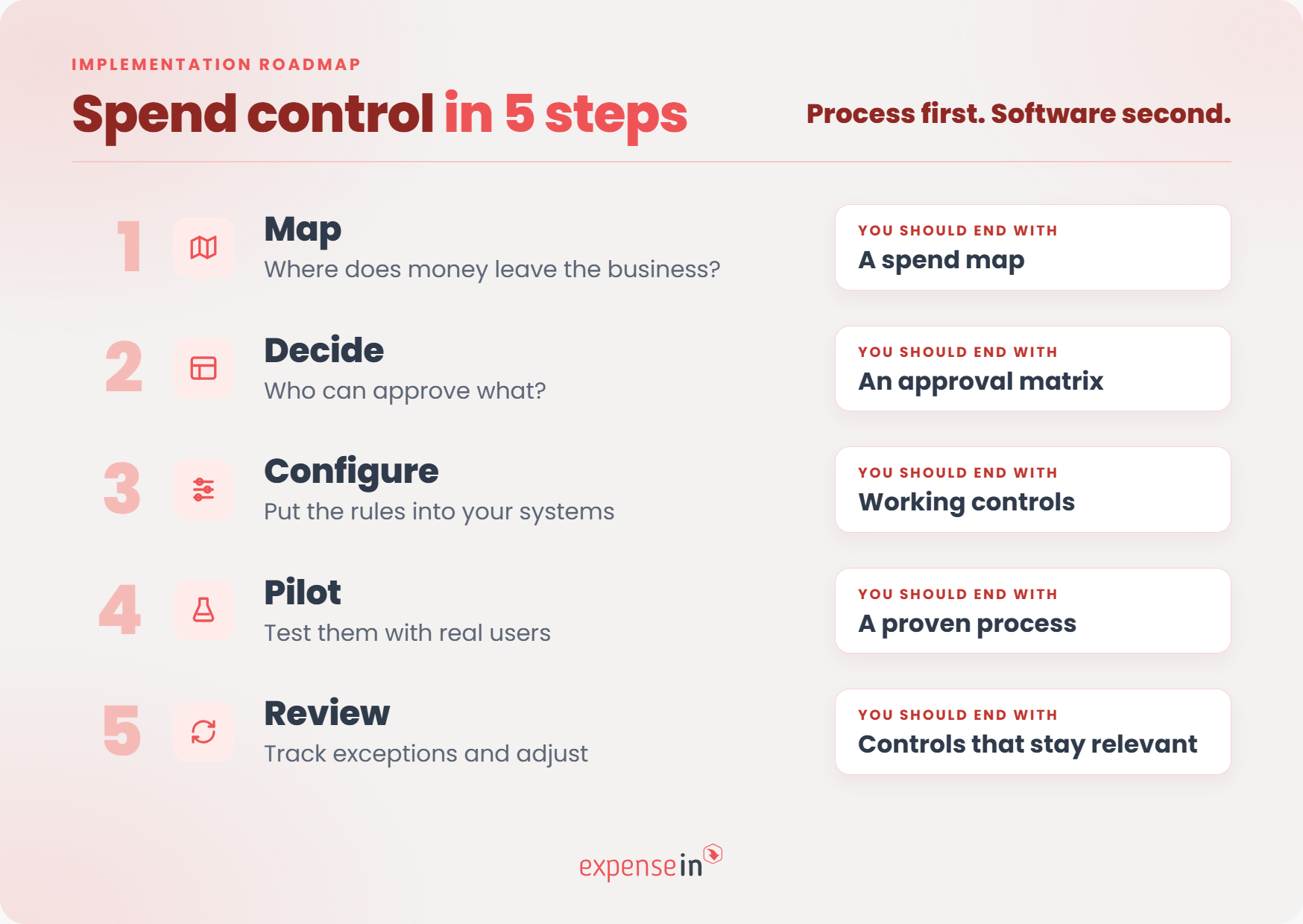 Step 1: Map how money leaves the business
List the main ways employees and teams spend money today, including:
For each one, note who initiates the spend, who approves it, when finance first sees it, and where the transaction is recorded.
You’re looking for gaps: spend that happens without clear ownership, approval, or visibility.
What you should have at the end: A simple map of your main spend routes and the points where control is weak or missing.
Turn your policy into clear decision rights.
Document:
who owns each budget
which purchases need approval
approval thresholds
who handles exceptions
when finance gets involved
A £20 train fare and a £20,000 software contract should not follow the same route.
What you should have at the end: An approval matrix that makes it clear who signs off on what.
Build the agreed rules into the tools people use.
That could include approval routing, card restrictions, receipt requirements, policy checks, VAT coding, and accounting integrations.
Test the awkward cases too. What happens when an approver is away? Who handles an urgent exception? What happens when a claim breaches two rules?
Young Enterprise moved from Excel claims, email approvals, and manual Sage journal entries to ExpenseIn and says a finance process that previously took three days a month now takes “a couple of hours at most”.
What you should have at the end: A process that handles routine spend consistently and makes exceptions easy to spot.
Start with one team, spend category, or process where the problem is clear.
During the pilot, look at:
where employees get stuck
which approvals take too long
which rules produce too many exceptions
whether finance gets the information it needs
Prodrive used a pilot period and employee feedback when introducing ExpenseIn, before rolling the system out more widely.
What you should have at the end: A process tested in real working conditions, not just on paper.
Once controls are running, pay attention to where they are being challenged.
Ask:
Which rules are breached most often?
Where are approvals slowing down?
Are particular teams requesting repeated exceptions?
Are limits too high or too low?
Are late claims still affecting reporting?
Repeated exceptions can point to employee behaviour, but they can also show that a rule or approval route no longer fits the business.
What you should have at the end: Controls that continue to reflect how people actually spend.
As spend grows across more employees, teams and payment methods, manual controls become harder to apply consistently.
Spend control software puts those rules into the process rather than leaving finance to manage them through policy documents, inboxes and spreadsheets.
Depending on the system, that can include:
policy checks and approvals
company-card controls
receipt and evidence capture
coding and reconciliation
reporting and accounting integration
The real test is how those functions work together.
Spotting an out-of-policy expense is useful. Spotting it, sending it to the right approver, retaining the decision, and passing the correctly coded transaction into your accounts is much more useful.
When comparing business spend control software, test it against your own finance process rather than the length of the feature list.
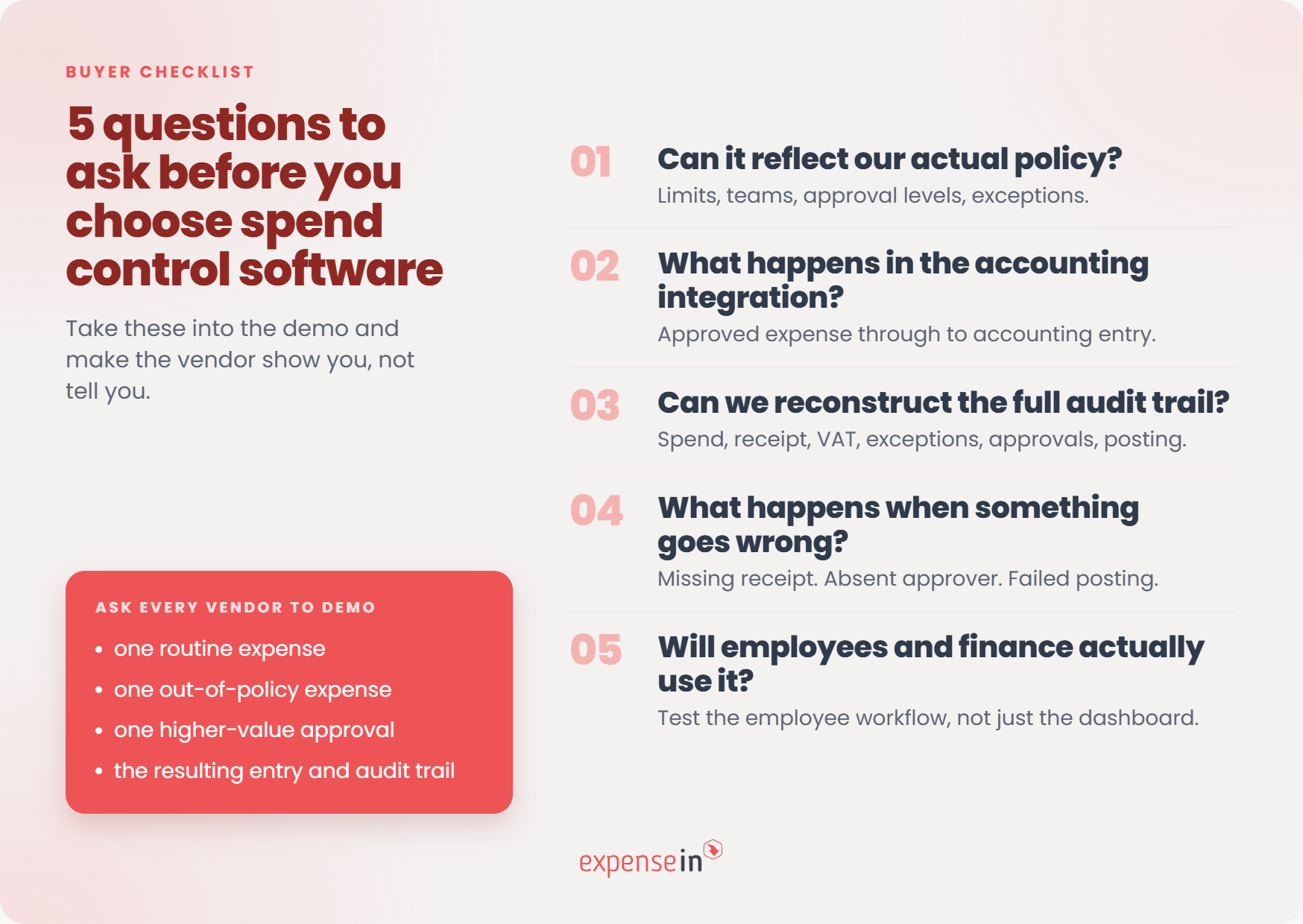 1. Can it reflect your actual policy?
Ask whether rules can vary by value, team, spend type or employee group.
Can you set different approval levels? Require receipts for particular expenses? Send exceptions down a different route?
If the software can’t reflect the policy, finance may end up managing the difficult cases somewhere else.
“Integration” can mean anything from a CSV export to direct posting.
Ask what data moves between systems, how fields are mapped and what happens when something fails.
For UK and Irish teams, check how the software handles:
nominal or general-ledger codes
VAT or tax codes
departments, projects or tracking categories
supporting receipts
corrections and rejected postings
ExpenseIn supports accounting integrations including AccountsIQ, Xero, QuickBooks and several Sage products, alongside other accounting platforms.
Ask vendors to show you the journey from approved expense to accounting entry, not simply confirm that an integration exists.
You should be able to follow a transaction without reconstructing the story from several places.
Check whether you can see:
who incurred the spend
the business reason
supporting evidence
relevant VAT information
policy exceptions
approval or rejection history
what was posted to the accounts
Software can support good record-keeping, but it does not automatically make an expense tax-deductible, VAT-recoverable or compliant.
Ask the vendor to demonstrate an awkward transaction, not just the perfect workflow.
For example:
an approver is away
a receipt is missing
a limit is exceeded
an expense breaches multiple rules
an accounting posting fails
If every exception ends up back in email, you’ve found an important limitation.
Test the employee experience as well as the finance dashboard.
How many steps does it take to submit an expense, add evidence or respond to a query? How much work is involved when finance changes an approver, department, policy or accounting mapping?
The software should reduce administration, not simply move it somewhere else.
A useful vendor test is to give each provider the same four scenarios and ask them to show you:
a routine expense
an out-of-policy expense
a higher-value purchase needing additional approval
the resulting accounting entry and audit trail
That will tell you far more than a standard product demonstration.
ExpenseIn builds controls into the way expenses and card spend are handled, reducing the need for manual checks at every stage.
ExpenseIn Cards: spending controls can be set around merchant categories, countries, spending days and transaction values.
Automated Policies: policy rules can warn employees, block submission or flag an issue for review.
Receipt Verification: AI-assisted receipt checks compare receipt information with the expense claim and flag potential issues for review. The approver still makes the decision.
Advanced Approvals: approval workflows route claims according to the limits and conditions you set.
Together, those controls give finance several points to apply or review company rules across card use, submission and approval.
 Common spend control challenges (and how to get past them)
Even well-designed controls can stop working if they create too much friction, rely on manual effort or aren’t reviewed as the business changes.
The warning signs are usually visible long before they become a bigger problem.
One of the clearest signs that a control isn’t working is when people routinely find ways around it.
ICAEW describes the problem plainly:
“Keep each one below the next approval threshold and the system can’t tell they are part of a larger commitment.”
ExpenseIn’s data shows why the approval stage deserves attention too: 12% of expenses already flagged as out of policy are approved anyway.
An approved exception may be entirely justified. The problem is when nobody records why.
Monitor which rules generate repeated exceptions, who approves them and whether the same workaround keeps appearing. Before adding another rule, check whether the existing one still makes sense.
ExpenseIn’s 2025 research found that 28% of UK employees described their company’s expense process as “highly manual”.
For finance, that often means chasing receipts, forwarding claims, checking the same rules repeatedly, and re-keying information.
Charlotte O'Sullivan, Purchase Ledger and Banking Manager at The Original Factory Shop, says:
“[ExpenseIn has] taken our processing time down from 2 days to half a day.”
The useful split is between tasks that need judgement and tasks that are simply repetitive. Automate the latter first.
An approval only adds control if the approver has enough information, authority and time to make a real decision.
Too much friction encourages workarounds. Too little scrutiny turns approval into a rubber stamp.
Bath Rugby describes the problem with its previous process:
“Our previous paper-based expense process meant that it was difficult for staff to submit claims on time and gain approval easily. This also meant an intensive review process for the finance team.”
Watch for claims repeatedly sitting with the same person, constant employee chasing, or approvers who challenge almost nothing.
If an approval adds delay but little scrutiny, change the route rather than adding another sign-off.
People move roles. Teams restructure. Limits become outdated. New types of spend appear.
ICAEW recommends regular monitoring and review of internal controls to check whether they remain effective and need to change.
A periodic review should cover:
outdated approvers
repeated exceptions
frequently overridden controls
limits that no longer fit the role
new spend categories without clear ownership
A control that made sense twelve months ago may not fit the business today.
No. Spend control is about making sure money is spent in the right place, by the right people and within agreed boundaries.
A business may deliberately increase spending in one area because the investment makes sense. Cost reduction is one possible outcome, not the definition.
Common examples include expense policies, approval thresholds, company card limits, merchant restrictions, receipt requirements, approved suppliers and automated policy checks.
The right mix depends on how the organisation spends money and where the greatest risks or administrative problems sit.
Spend control can support better record-keeping by capturing receipts, transaction information and approval history consistently.
That can support UK VAT record-keeping and audit processes, but software or internal approval does not make an expense automatically allowable for tax purposes.
For Irish organisations, clear records and supporting evidence can similarly help with Revenue record-keeping requirements.
Always check the latest HMRC or Revenue guidance and take professional advice where needed.
Map how money leaves the business today.
Identify the main spend routes, who can initiate them, how they are approved and when finance first sees the transaction.
That will show you where controls are missing or happening too late. Set the process and decision rights first, then choose the software that supports them.
Want to move spend control closer to the point of purchase? Book a demo and see how ExpenseIn brings expense policies, approvals, cards, and reporting into one connected process.
If you’re not tracking employee spending, your business’s bottom line may be suffering. Learn how to track employee spending, along with its major benefits.

